

rbt application pending or expired: this guide explains the planning and recordkeeping question behind the topic, while the current BACB Handbook, forms, and portal instructions control the final requirement.
rbt application pending or expired: Pending and expired are different problems
The phrase RBT application pending or expired describes two different situations. Pending generally means a submitted item is still in a review or action state. Expired means the application’s active period has ended under the current BACB rules. A delay in processing does not automatically prove that an application is expired, and an expiration message should not be treated as a routine review delay.
The current BACB Handbook and portal instructions control the meaning of the status shown in a particular account. This guide gives a decision framework for organizing the information; it cannot see an applicant’s account or promise a processing result.
Start with the exact status and date
Save the exact portal wording, the date it was displayed, the application number if available, and any action-item message. Avoid relying on a browser bookmark or memory. A screenshot or downloaded notice can show whether the portal asked for a correction, indicated review, or stated that the active period ended.
Then create a timeline with payment, submission, attestation, competency assessment, document uploads, and communications. The timeline should identify which dates came from BACB and which came from your own records. This prevents a training date or an email date from being mistaken for the application’s start date.
How to think about a pending status
If the portal indicates that an application or document is pending, check whether it also lists an action item. A pending review and a pending applicant correction are not the same. Follow the current instruction, keep the submission receipt, and use BACB’s published processing updates for general timing context.
Do not submit duplicate applications just because a review takes time. Duplicates can create more dates and fees to reconcile. If the official portal or BACB support asks for a new submission, follow that instruction and preserve the record of the earlier application.
How to think about an expired status
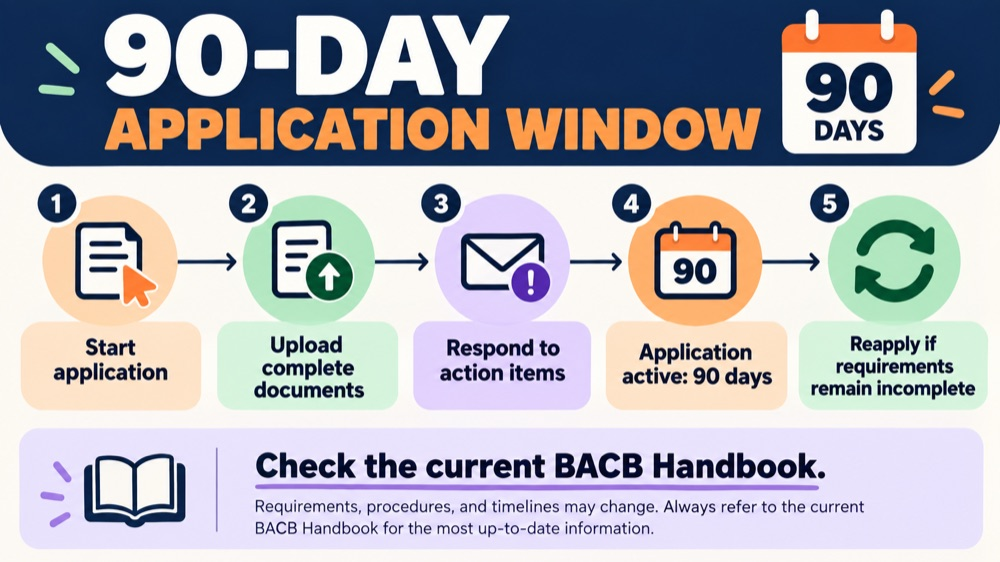
The current Handbook says an RBT certification application is active for 90 days and that an applicant who does not meet the requirements within that period must submit a new application and pay the fee again. An expiration notice should therefore trigger a careful reapplication review, not an assumption that the old application can be reopened.
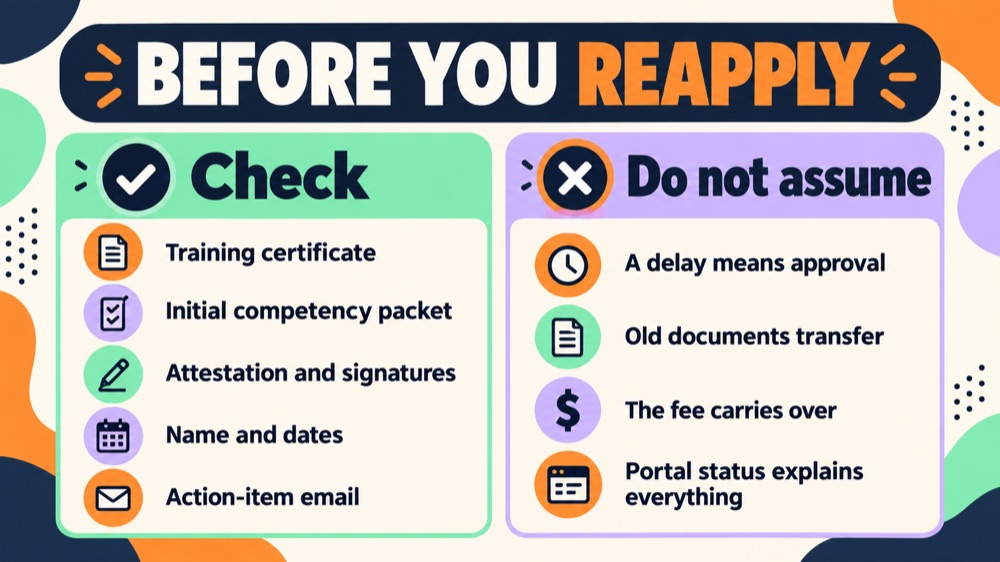
Before reapplying, check which documents may need to be current again. Review the attestation, background checks, abuse registry check, competency assessment, training evidence, and any portal instructions. Do not assume that a prior signature or assessment transfers automatically.
The four-question triage checklist
Ask four questions: What exact status does the portal show? What date controls that status? Is there an unresolved applicant action? Which current BACB document explains the next step? Write the answer beside each item. If one answer is unknown, contact BACB through the official channel rather than filling the gap with an online guess.
Keep processing time separate from the 90-day active window. A published queue update may explain why review takes time, but it does not change the rules for submitting complete documents or responding to an official action.
When to ask for help
Ask BACB for clarification when the portal status conflicts with a dated notice, a document is marked missing even though a receipt exists, or the application appears to have crossed a deadline while waiting for an official action. Include concise dates and the application identifier, and do not send unnecessary personal information.
Ask the training provider or attestor only about the documents they created. They cannot decide BACB’s application status. Keeping each question with the correct source usually resolves confusion faster than asking several people to interpret the same screenshot.
Frequently asked questions
Is pending the same as approved? No. A pending status means the review or action is not complete.
Can a pending application expire? It depends on the current official rules and account facts. Check the active-window rule and any BACB notice rather than assuming review pauses the clock.
Does expiration mean certification was denied? Not necessarily. It means the application period ended or the portal says it ended; the next step may be a new application, but current instructions control.
How to keep the decision clear
Before you close the file, write one sentence stating what the record proves and one sentence stating what it does not prove. For example, a training record can show completion, but it cannot by itself show that an application was approved. A signed form can show that an attestor made a confirmation, but it cannot replace a missing eligibility document. A calendar can show the dates you planned, but it cannot change an official deadline. This small distinction keeps a useful checklist from becoming an unsupported promise.
Save the current official source with the review date, then set a reminder to recheck it if your application or recertification cycle continues. Forms, handbook language, fees, portal instructions, and processing information can change. When a source changes, update the plan and preserve the earlier record rather than silently rewriting history. That approach makes the file easier for the applicant, provider, attestor, or assessor to understand later.
When the review is complete, record the next action, the person responsible for it, and the date you intend to revisit it. If the next action depends on an official response, label it as waiting rather than complete. If the next action is a document correction, keep the correction request with the file. This turns the article’s advice into a small workflow that can be checked by someone else without reinterpreting the whole history.
Keep the review brief enough to repeat. A dated checklist, a source link, and a clearly named next action are more useful than a long note with no owner. If another person takes over the file, they should be able to understand the status without changing any original record.
If the record is shared with a provider, attestor, assessor, or organization administrator, share only the portion needed for that person’s task. Keep a private note of what was sent, when it was sent, and whether a correction was requested. This is a practical privacy measure as well as a quality check: it reduces the chance that an old draft, a duplicate file, or an unrelated personal document is used by mistake.
Use the same review method whenever a date, form version, or portal instruction changes. First identify the official source, then compare the source with the saved record, then document the decision and next action. If the source is unclear, mark the item as needing confirmation. A transparent “waiting for confirmation” note is safer than filling in an uncertain answer and treating it as a completed requirement.
When possible, have a second person perform a visual check without changing the substance. A fresh review often catches a missing page, a mismatched name, an unreadable scan, or a date entered in the wrong field. Keep the reviewer’s note separate from the official form so the original record remains intact.
Source and scope: This is an educational summary of public BACB guidance, not individualized certification, legal, immigration, employment, or financial advice. Check the current BACB Handbook, forms, portal instructions, and organization records before acting.