
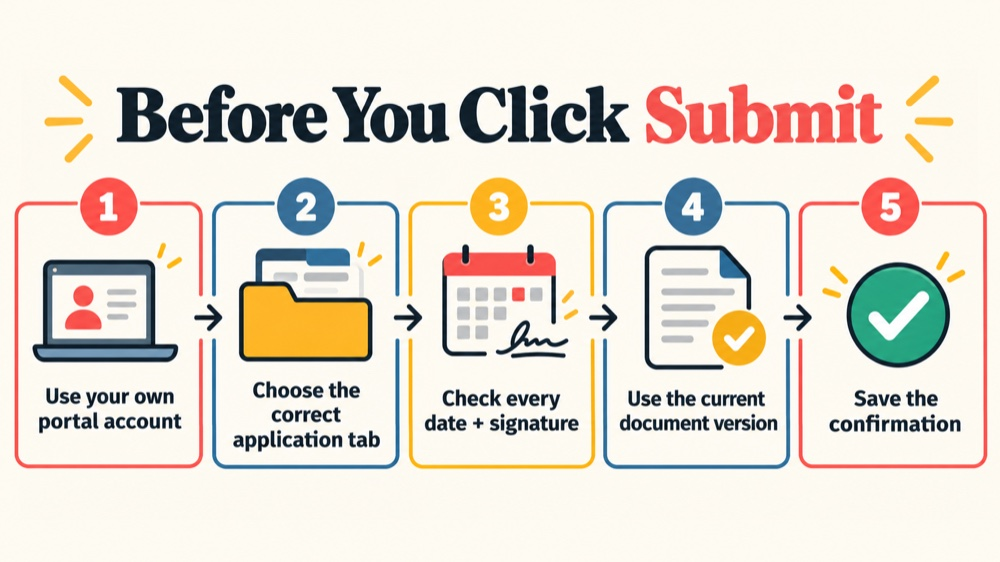
The most useful RBT application tips are not shortcuts around BACB requirements. They are quality-control habits that help you catch the errors most likely to delay a review: using the wrong account or application tab, uploading an outdated document, missing a signature or date, and submitting without saving the confirmation. This guide is a final review method for initial certification and recertification applicants; the current RBT Handbook and BACB Portal instructions control the live application.
Table of Contents
- What these RBT application tips are designed to prevent
- Tip 1: Use the current Handbook as your source of truth
- Tip 2: Protect ownership of your Portal account
- Tip 3: Choose the correct application path
- Tip 4: Audit dates, signatures, fields, and document versions
- Tip 5: Plan timing and save the submission trail
- Common mistakes that look small but create friction
- Frequently asked questions
- Official sources and scope
RBT application quality-control guide
RBT Application Tips: Avoid BACB Submission Errors
Use a final error check for your account, application path, document versions, dates, signatures, timing, and confirmation.
RBT application tips are most useful when they help you catch an avoidable submission error before it becomes a portal action item. The common problems are usually practical: the applicant cannot access the account, the wrong tab is used, a form has a missing signature or date, a document version is outdated, or the applicant submits without saving a confirmation.
This article is a final quality-control method for both initial certification and recertification. It is not a replacement for the current BACB Handbook or a promise that an application will be approved. Requirements and document versions can change, so use the live official instructions on the day you submit.
What these RBT application tips are designed to prevent
An application can be delayed even when the applicant has completed the underlying training or assessment. A missing page, a blank field, an incorrect certification number, or a document in the wrong application area can require follow-up. If materials are resubmitted in response to an action item, the processing date may change according to the current BACB process.
The goal of a final check is not to invent extra requirements. It is to compare each item with the current official source, confirm that the file says what it needs to say, and preserve evidence of what you submitted. Think of the review as a controlled handoff: your Portal account, your application path, your documents, your payment or submission record, and the official instructions should all agree.
Tip 1: Use the current Handbook as your source of truth
Start with the current RBT Handbook, not an old screenshot, a coworker’s saved checklist, or a training provider’s generic page. BACB’s current application-tips article recommends the Handbook for eligibility, application, and recertification information and suggests reviewing questions with an RBT Supervisor or RBT Requirements Coordinator.
Before collecting files, write down the Handbook version or update date you checked. Then identify which pathway you are using: initial certification or recertification. If a portal label, downloaded form, or employer instruction conflicts with the current official source, pause and resolve the difference before submitting. A neat packet based on an old rule is still the wrong packet.
Use the official RBT application resources for links to current requirements. The page can change as the BACB updates the pathway, so avoid copying a document list forward from a previous application cycle.
Tip 2: Protect ownership of your Portal account
Create your BACB Portal account yourself. The account belongs to the applicant, even if an employer or supervisor helps explain the process. BACB advises applicants not to have an employer, future supervisor, or another person create the account on their behalf.
Use a personal email address that you expect to control over time rather than a work or school address that could disappear when your job, program, or placement changes. Add bacb.com to your safe-sender list and check spam folders when you are waiting for a message. These are simple access habits, but losing access at the wrong stage can create unnecessary delay.
If you lose access to an existing account, contact BACB through the official Contact Us route. Do not create a second account just to get around a password or email problem. Duplicate accounts can make it harder to match your history, documents, and certification information.
Tip 3: Choose the correct application path
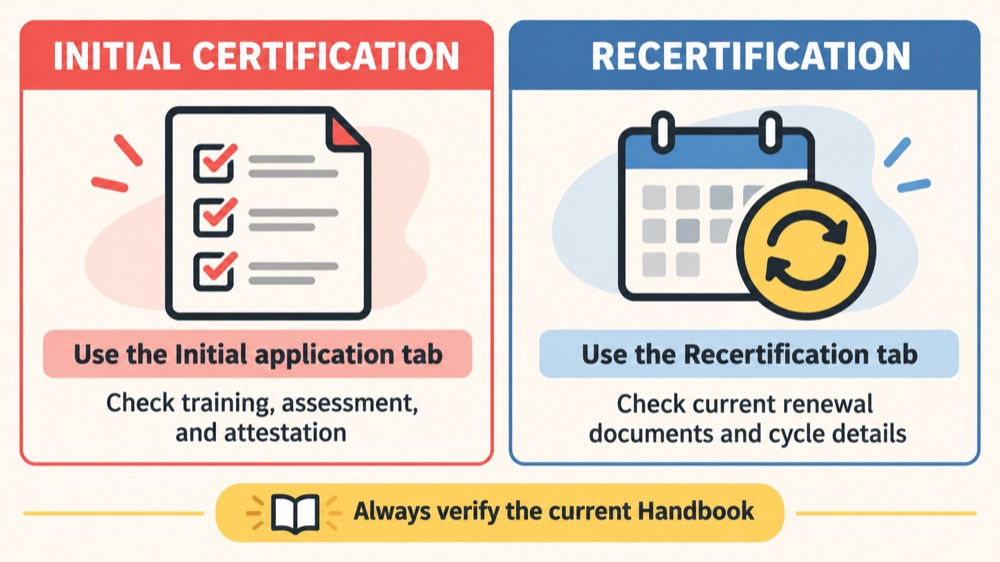
Initial certification and recertification are not interchangeable workflows. Confirm the exact application tab displayed in your Portal before uploading anything. A file can be accurate and still be attached to the wrong pathway.
- Initial certification: review the current training, competency-assessment, attestation, and application requirements that apply to a first certification request.
- Recertification: use the current Recertification area and review the documents, cycle dates, competency-assessment rules, or professional-development requirements that apply to renewal.
The current BACB application-tips page identifies differences between the two paths. For example, the current initial-certification guidance includes a 2026 training-certificate statement, details for the Initial Competency Assessment, and an RBT Certification Application Attestation. The recertification guidance uses the Recertification tab and has its own document and timing rules. These details are time-sensitive; verify the current page instead of treating this paragraph as a permanent document list.
Tip 4: Audit dates, signatures, fields, and document versions
Open every file before uploading it. Do not rely on the filename alone. A final document audit should answer five questions:
- Is this the current form? Compare the title, version, and date with the official BACB source. Do not use an initial assessment packet for a recertification request simply because both files have similar names.
- Is every required field complete? Check boxes, task initials, printed names, certification numbers, dates, and signatures. A blank field can be more important than a beautifully scanned page.
- Does the document support the correct pathway? Confirm that the training, assessment, attestation, or professional-development record belongs to the application you selected.
- Is the timing valid? Check the current window for the assessment, attestation, renewal cycle, or other time-sensitive item. Do not assume that a document accepted last year is still within the current window.
- Is the upload readable and complete? Make sure all pages are present, oriented correctly, and attached to the intended Portal item. If a recertification section allows one attachment, combine the multipage document as required by the current instructions.
For initial certification, the current BACB tips identify specific checks for the 40-hour training certificate, Initial Competency Assessment, and attestation. For recertification, the page identifies the correct Recertification tab, multipage attachment handling, and changing rules around competency assessment and professional-development documentation. Because these details can change, use them as prompts to verify—not as a substitute for opening the current source.
Tip 5: Plan timing and save the submission trail
Give yourself time for a second review. BACB notes that missing, incorrect, or incomplete documentation can cause delays beyond the standard processing timeline. The current Application Processing Updates page is the authority for the submissions currently being reviewed; it changes over time and should not be replaced by an old estimate.
Submit only after the final comparison is complete. Then save the confirmation number, payment or submission receipt, the final filenames, and the date you submitted. If the Portal creates an action item, read exactly what it asks for. BACB states that applications and documents resubmitted through Portal action items are reviewed in the order received, so respond with the corrected file through the requested route instead of sending unrelated duplicates.
Keep a short timeline with the submission date, any action-item date, the date you resubmitted, and the message or confirmation associated with each step. This record does not guarantee faster processing, but it makes follow-up more precise and helps you avoid uploading an older version by mistake.
Common mistakes that look small but create friction
- Using a work email: the applicant later loses access when the job changes.
- Creating a second account: the applicant cannot find the original application history.
- Choosing the wrong tab: a correct document is placed in the wrong workflow.
- Uploading an old version: the form looks complete but does not match the current requirement.
- Leaving a date or signature blank: the reviewer cannot confirm who completed the step or when.
- Submitting a partial scan: a missing page or unreadable field requires a new upload.
- Relying on an old timeline: the applicant plans around a processing estimate that no longer reflects the live queue.
These are quality-control issues, not evidence that an applicant is unqualified. Treat them as reasons to slow down, compare the current source, and ask the appropriate supervisor or BACB support route a focused question.
Frequently asked questions
Do these RBT application tips guarantee approval?
No. They reduce avoidable submission errors. BACB’s formal review, current Handbook, and application instructions determine whether the requirements are met.
Should my employer create my BACB Portal account?
No. Create and maintain your own account. An employer or supervisor can help you understand a process, but the account and its access should remain under your control.
Can I use the same document list for initial certification and recertification?
No. The pathways use different tabs and can have different documents, versions, timing rules, and cycle requirements. Verify the current path before uploading.
What should I do if I lose access to my Portal account?
Use the official BACB Contact Us route for help with the existing account. Do not create a duplicate account just to regain access.
Where can I check how quickly applications are being reviewed?
Use BACB’s current Application Processing Updates page. It is a changing queue indicator, not a guarantee for an individual application.
Official sources and scope
This article was checked against BACB’s 5 Must-Know RBT Application Tips, the Application Processing Updates page, the RBT application resources, and the current RBT Handbook. Requirements, document versions, and Portal labels can change; verify the live official instructions before submitting.
Ready to practice the RBT concepts you just reviewed?
Try an independent, original RBT practice resource with exam-style questions, scoring, and answer explanations.
References
- Behavior Analyst Certification Board. RBT Test Content Outline, 3rd edition.
- Behavior Analyst Certification Board. RBT Handbook.
- Behavior Analyst Certification Board. RBT Ethics Code.