
RBT supervisor add supervisee tasks should confirm the relationship, verify identity and role details, check dates and route, and follow up on the approved record.
Table of Contents
- What the RBT supervisor add supervisee update does
- Confirm mutual agreement
- Verify identity and role
- Set dates and the approved route
- Record and orient the supervisee
- Review the relationship after entry
- Common onboarding mistakes
- Frequently asked questions
- References
RBT SUPERVISION · ADMINISTRATION
RBT Supervisor Add Supervisee: Checklist
A verification-first checklist for confirming a relationship, recording details, and following up.
RBT supervisor add supervisee tasks should confirm the relationship, verify identity and role details, check dates and route, and follow up on the approved record. An account entry is an administrative step. It does not replace mutual agreement, assigned supervision activities, accurate documentation, or current requirements.
Portal labels and organization workflows can change. Use current official instructions and the responsible organization’s process. This article provides a practical checklist, not a determination that a particular supervisor or supervisee meets an individualized employment, credentialing, or clinical requirement.
What the RBT supervisor add supervisee update does
The update connects a person to a supervision relationship in an approved system or record. It may support invitations, documentation, status tracking, or communication. The meaning depends on the system and the organization. A saved name may be pending, submitted, active, or awaiting another person’s action.
Separate the administrative task from the supervision work. The supervisor still needs to clarify responsibilities, communication, observation, feedback, documentation, privacy, and escalation. The supervisee still needs to understand the assigned role and ask when a procedure or status is unclear.
Confirm mutual agreement
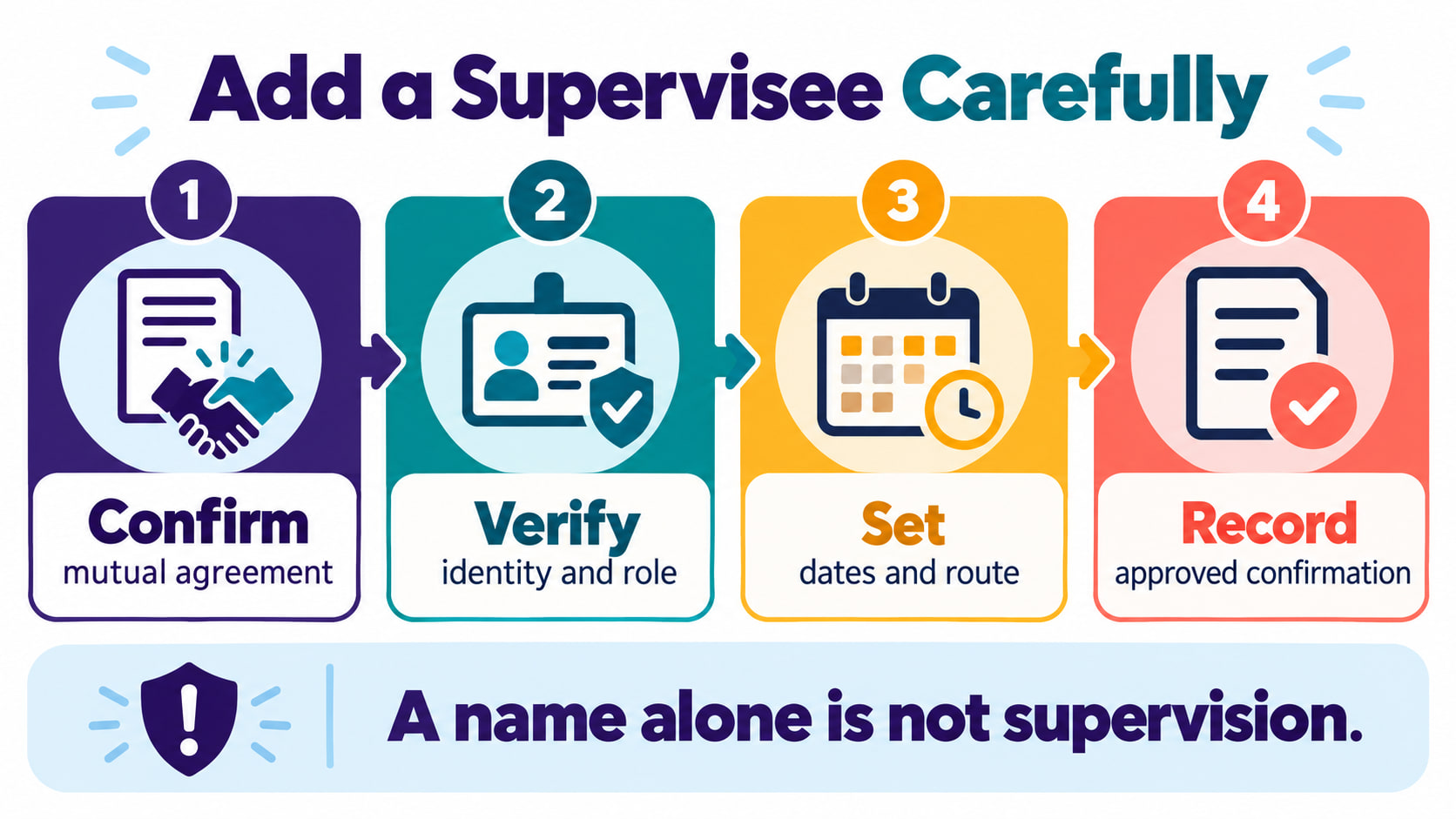
Before entering information, confirm that the supervisor and supervisee agree to the relationship and understand which organization or setting it concerns. Do not add a person because their name appears in a directory or because someone assumes the relationship will be accepted later.
Clarify who initiates the request, who must accept an invitation, and which person is responsible for correcting an error. If the relationship ended, paused, or has not begun, use the current change process rather than creating a record that suggests supervision occurred.
Verify identity and role
Check the supervisee’s name, account identifier, role, organization, and any required contact details against the authorized source. Similar names and multiple accounts can send an update to the wrong record. Use only the information required by the approved system.
Verify that the supervisor is using the correct account and permission level. Keep credentials private and use a secure device. If the system shows a mismatch, stop and use the support or correction route instead of creating a workaround or using another person’s login.
Set dates and the approved route
Review the start date, end date, organization, service context, and status fields the current process requires. Enter dates that can be supported by the authorized record. Do not backdate a relationship to make a timeline appear complete, and do not choose a date simply because a portal accepts it.
Follow the current portal prompts, invitation steps, signatures, or organization approvals. A supervisor’s submission may need a separate acceptance or review. Read notices carefully and note whether the status is pending, active, returned, or incomplete.
Record and orient the supervisee
After the entry, use the approved record to confirm what was submitted and what remains. Tell the supervisee how to communicate questions, where records belong, how privacy is protected, and what to do if the status does not match the expected relationship. Use a clear, role-appropriate orientation rather than assuming the portal entry explains the work.
Document objective facts and required follow-up. Keep copies only according to policy and do not send account screenshots through personal channels. If a client record is involved, use the smallest amount of information needed and the authorized system.
Review the relationship after entry
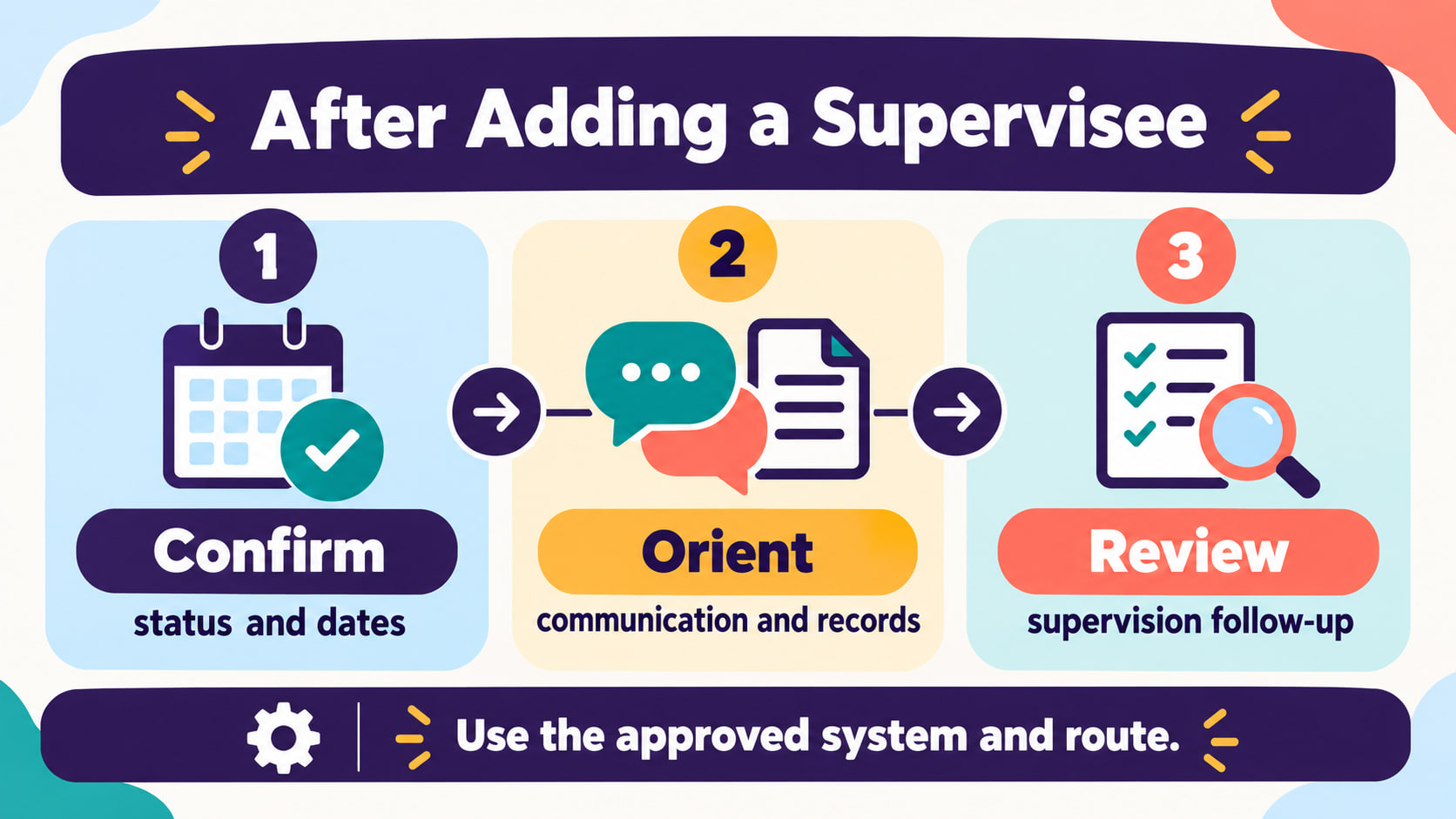
Return to the authoritative system and confirm the status changed as expected. Check whether the supervisee accepted an invitation, whether dates display correctly, and whether any required action remains. A submission is not automatically approval, and a name is not automatically evidence that a supervision activity happened.
Schedule the next review according to the setting’s process. Discuss observation, feedback, records, professional conduct, and questions. If the status is wrong or the relationship changes, use the correction or removal route promptly and keep the record factual.
Common onboarding mistakes
- Adding without agreement: the person or organization has not confirmed the relationship.
- Using the wrong account: a similar name or saved login creates a mismatched record.
- Guessing dates: unsupported dates can distort the supervision timeline.
- Confusing entry with supervision: administrative setup does not prove observation or feedback occurred.
- Skipping orientation: the supervisee does not know the communication, privacy, or escalation route.
- Ignoring follow-up: a pending or returned status is left unresolved.
The practical sequence is confirm, verify, set, record, and review. It keeps the relationship accurate while leaving clinical, employment, and credentialing decisions with the responsible people and current processes.
Frequently asked questions
Does adding a supervisee prove supervision has begun?
No. The entry may be one administrative step. Confirm the relationship, required acceptance, assigned activities, and current status.
What if the supervisee does not appear after I submit?
Check the status, required next action, and current instructions. Use the designated organization or support route and document the response.
Can a supervisor add someone without their agreement?
Do not assume that they can. Confirm mutual agreement and follow the authorized process for the setting.
What should I review after adding a supervisee?
Review identity, role, dates, status, communication, privacy, records, and the next supervision follow-up. Correct discrepancies through the approved route.
Source note: Review current BACB materials, current portal instructions, organizational policy, approved systems, and supervisor or administrator direction for your situation. This article is educational and does not provide individualized legal, clinical, employment, or credentialing advice.
Ready to practice the RBT concepts you just reviewed?
Try an independent, original RBT practice resource with exam-style questions, scoring, and answer explanations.
References
- Behavior Analyst Certification Board. RBT Test Content Outline, 3rd edition.
- Behavior Analyst Certification Board. RBT Handbook.
- Behavior Analyst Certification Board. RBT Ethics Code.