
RBT account maintenance means keeping the BACB account you control accurate and accessible over time. Check your profile, personal email, address, invoices, subscriptions, security, and certification information on a routine schedule—and update details promptly when they change. The current portal, Portal Knowledge Base, RBT Handbook, and Contact Us instructions control the exact screens and support route.
Table of Contents
- What RBT account maintenance includes
- How to use an RBT account maintenance checklist
- RBT Account Maintenance: keep profile and contact information current
- RBT Account Maintenance: protect email access, passwords, and notifications
- Review invoices, subscriptions, and certification information
- When to update the portal and when to contact BACB
- Common RBT account maintenance mistakes
- Frequently asked questions
- Official sources and scope
BACB account readiness and maintenance guide
RBT Account Maintenance: Keep BACB Details Current
Use a simple routine for profile details, email access, address, invoices, notifications, security, and certification information.
RBT account maintenance means keeping the BACB account you control accurate and accessible over time. Check your profile, personal email, address, invoices, subscriptions, security, and certification information on a routine schedule—and update details promptly when they change.
This is different from completing an RBT application or reading a portal tutorial. Maintenance is the ongoing habit that prevents a lost email address, stale contact information, missed message, unpaid invoice, or duplicate account from becoming a larger certification problem. The current BACB portal, Portal Knowledge Base, RBT Handbook, and Contact Us instructions control the exact screens and support route.
What RBT account maintenance includes
Your BACB account is the doorway to your certification information and application history. BACB’s application guidance emphasizes that the account should be created and maintained by the applicant or certificant, not by a supervisor, employer, trainer, or recruiter. The account should remain under your control even when another person helps you understand a requirement or participates in an authorized supervision workflow.
Maintenance has five practical goals:
- Accuracy: your name, address, email, and other profile details reflect your current information.
- Access: you can sign in, receive a verification code, and recover the account through the official route.
- Visibility: you can see invoices, application statuses, action items, certification information, and relevant history.
- Communication: BACB messages and account notifications can reach you and are not silently filtered as spam.
- Evidence: you can locate receipts, reports, and submitted information when a later application or support question requires them.
How to use an RBT account maintenance checklist
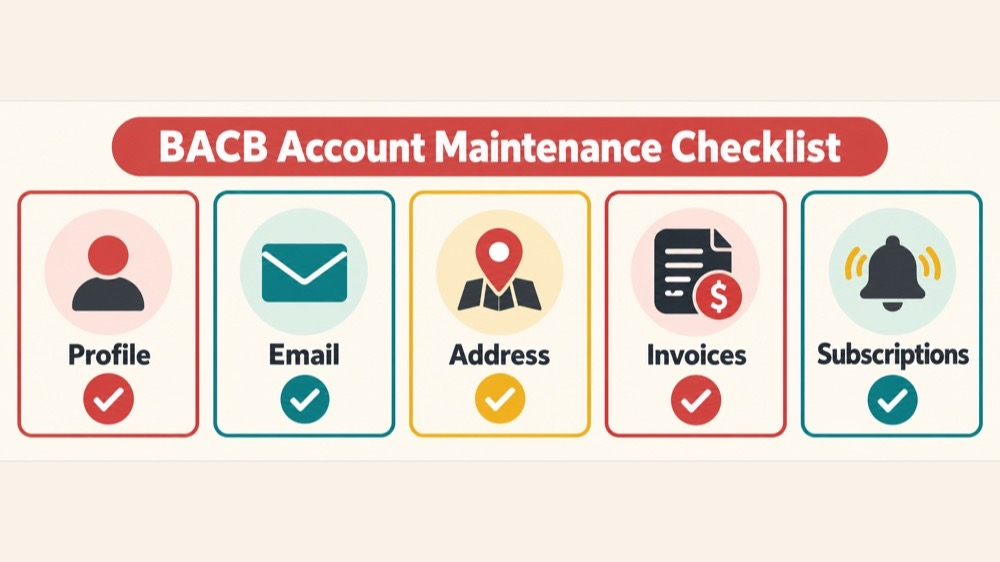
Run a short review when you start or renew an application, when your contact details change, and at a regular interval during the year. You do not need to change something every time; the point is to verify that the account is still accurate and accessible.
- Open the official portal. Use the BACB portal and the email associated with your account.
- Review the profile. Check your name, address, email, and other visible personal information.
- Review account activity. Look for invoices, payments, applications, action items, certification information, and status messages.
- Check communications. Confirm that BACB messages arrive and that your preferences reflect what you want to receive.
- Record unresolved problems. Note the page, tab, date, status, and error before using the Knowledge Base or Contact Us.
RBT Account Maintenance: keep profile and contact information current
Name and address
If your name or address changes, use the current profile or name-update instructions in the portal. BACB’s support guidance describes a name-update path under My Account and Profile Settings, with documentation submitted when required. A name change is not merely an email request; follow the live form and documentation instructions.
An address update is also worth checking after a move, because the account may contain information used for certification communication or identity verification. Enter the current information carefully and save or submit the change as the portal requires. Do not assume that changing an employer’s record changes your personal BACB account.
Email address
Use an email address you expect to control for the long term. BACB’s application guidance recommends a personal email rather than a work or school address because losing access to that organization’s inbox can also make it harder to access the portal. Add bacb.com to your safe-sender list and check spam or junk folders when you are waiting for a message.
If you can sign in, follow the portal’s current email-change flow, including any verification code. If you no longer have access to the email on file, do not create a second account. Use the official Contact Us route so BACB can verify your identity and help you recover the existing account.
RBT Account Maintenance: protect email access, passwords, and notifications
The updated portal launched on June 29, 2026. Existing account holders must reset their password using the email already associated with the account before first signing in to the new system; new users create an account. If you have already completed that transition, continue to protect the account as a personal credential.
- Keep the account email under your control.
- Never share your password, verification code, or recovery email with a supervisor, employer, or training provider.
- Use the official Forgot Password route when you cannot sign in.
- Check spam or junk if a code or important BACB message does not arrive.
- Do not create a duplicate account to work around an access problem.
- Use a current browser and the official portal address before entering credentials.
These habits protect more than convenience. A duplicate account can separate your current application, payment history, certification record, or prior communications from the account BACB already has on file. If you suspect an account-security problem, stop experimenting with new accounts and use the official support channel.
Review invoices, subscriptions, and certification information
Invoices and payments
BACB’s current support guidance directs account holders to My Account and Invoices and Payments to view outstanding invoices and previously paid invoices or receipts. Review this area when you begin an application, receive a payment message, or need evidence of a transaction. Save only the record your process requires and protect payment-related information.
Subscriptions and notifications
If you want to change mass-email preferences, BACB’s guidance directs users to My Account, Profile Settings, and Mass-Email Subscriptions. A preference change affects communications; it does not change certification requirements or guarantee that every operational message will be delivered. Keep the account email current and still monitor the portal for action items and status changes.
Certification information and history
Use the portal and Certificant Registry to check the public certification information relevant to your situation. The updated portal can provide more detailed account information than the public Registry, including inactive-status reasons, recertification cycles, and status-change history. A maintenance review should help you find that information; it does not turn a profile check into an approval or compliance decision.
When an application or renewal is active, also look for status language such as an outstanding action item or requested document. Maintenance is not complete if you update your profile but overlook a task waiting inside the application.
When to update the portal and when to contact BACB
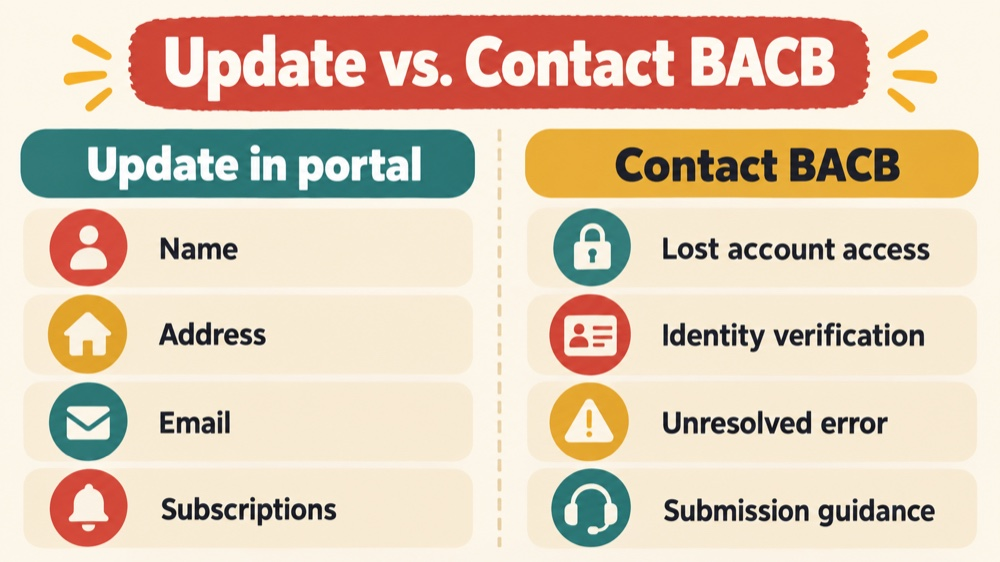
Use the portal for routine changes that the current interface supports: profile details, address, email, subscription preferences, invoice viewing, and certification information. Use the BACB Portal Knowledge Base when you need the current navigation or a known-issue explanation.
Use Contact Us when:
- you no longer have access to the email associated with the account;
- a password reset or verification-code process does not work;
- the portal shows missing or incorrect account information that you cannot correct;
- the current instructions require identity verification;
- you need clarification about where an official document or request belongs; or
- an account-specific error remains after you follow the current Knowledge Base steps.
Before contacting BACB, prepare the account role, page or tab, date, exact message, steps already tried, and the outcome you need. Do not include unrelated client information, passwords, or verification codes. A concise, privacy-safe description gives support a better starting point.
Common RBT account maintenance mistakes
- Using a work email: an employer change can become an account-access problem.
- Creating a second account: recover the existing account through BACB instead.
- Sharing credentials: assistance with a requirement does not mean another person should control your login.
- Updating only the public Registry: certification information and account details may require action inside the portal.
- Ignoring invoices: check payment records and outstanding items in the account.
- Turning off messages without a plan: notification preferences do not replace checking the portal for action items.
- Assuming a profile update solves every requirement: application, supervision, licensure, and employment rules remain separate questions.
Frequently asked questions
How often should I perform RBT account maintenance?
Check the account when you start or renew an application, whenever your personal information changes, and periodically during the year. The most important time is before a deadline or when you are waiting for a BACB message.
Should my employer create my BACB account?
No. BACB’s application guidance says the applicant or certificant should create and maintain the personal account. An employer or supervisor may support your process, but should not own your credentials.
What if I no longer have access to my account email?
Do not create a new account. Use the BACB Contact Us route and be prepared to complete identity verification so BACB can help with the existing account.
Can I change my name or address online?
Use the current profile and name-update instructions in the portal. Some changes may require documentation or a specific submission flow. Follow the live instructions rather than relying on an old screenshot.
Does updating my account renew my RBT certification?
No. Account maintenance keeps information and access current. Certification renewal, supervision, application, and other requirements are separate processes controlled by the current Handbook and portal.
Official sources and scope
This guide was checked against BACB’s RBT application and account tips, the Portal Knowledge Base, the new-portal access guide, the Contact Us guidance, the BACB portal, and the RBT resource page. Portal screens, requirements, forms, and support routes can change. Use the live BACB resources for a real account issue.
Ready to practice the RBT concepts you just reviewed?
Try an independent, original RBT practice resource with exam-style questions, scoring, and answer explanations.
References
- Behavior Analyst Certification Board. RBT Test Content Outline, 3rd edition.
- Behavior Analyst Certification Board. RBT Handbook.
- Behavior Analyst Certification Board. RBT Ethics Code.