

The rbt attestation form 2026 is part of the initial RBT certification application, not the Initial Competency Assessment. This guide explains who completes it, what it confirms, how the 180-day and 90-day windows differ, and what to check before uploading.
Table of Contents
- RBT attestation form 2026: the short answer
- Check the current form and version first
- Who completes and signs the attestation?
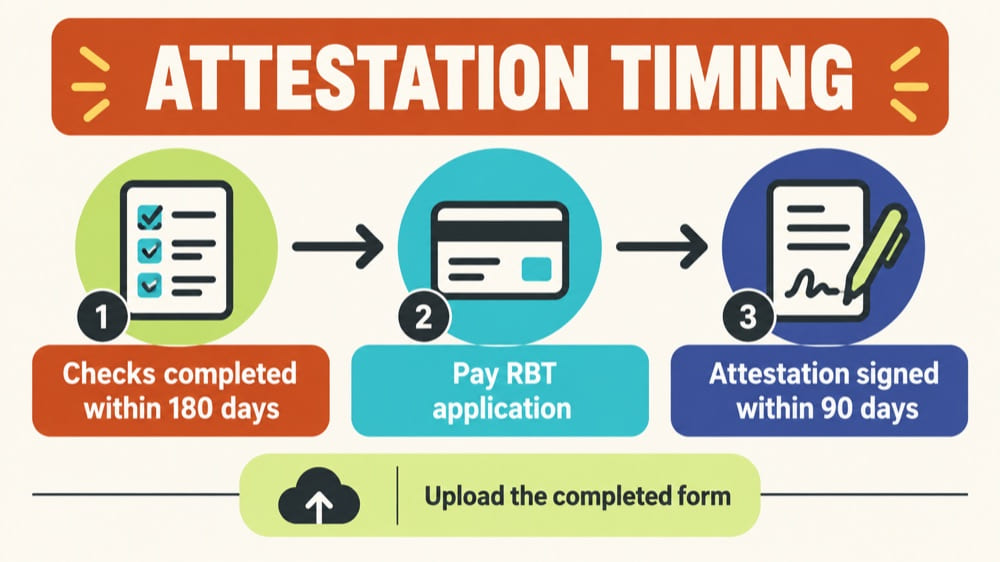
- Do not confuse the 180-day and 90-day windows
- What to prepare before asking for a signature
- How the form fits into the application
- Common submission problems
- What if BACB sends an Action Item?
- Frequently asked questions
- Official sources and review note
RBT Attestation Form 2026: A Current Submission Guide
If you are preparing an RBT attestation form 2026 submission, the two details to confirm first are who may attest to your information and which timing window applies to each document. The attestation form is part of the initial RBT certification application. It is not the RBT Initial Competency Assessment and it is not the recertification competency packet.
This guide explains the current submission sequence in plain language. Use the linked BACB sources for the controlling rule, and check the current portal wording immediately before you pay or submit.
RBT attestation form 2026: the short answer
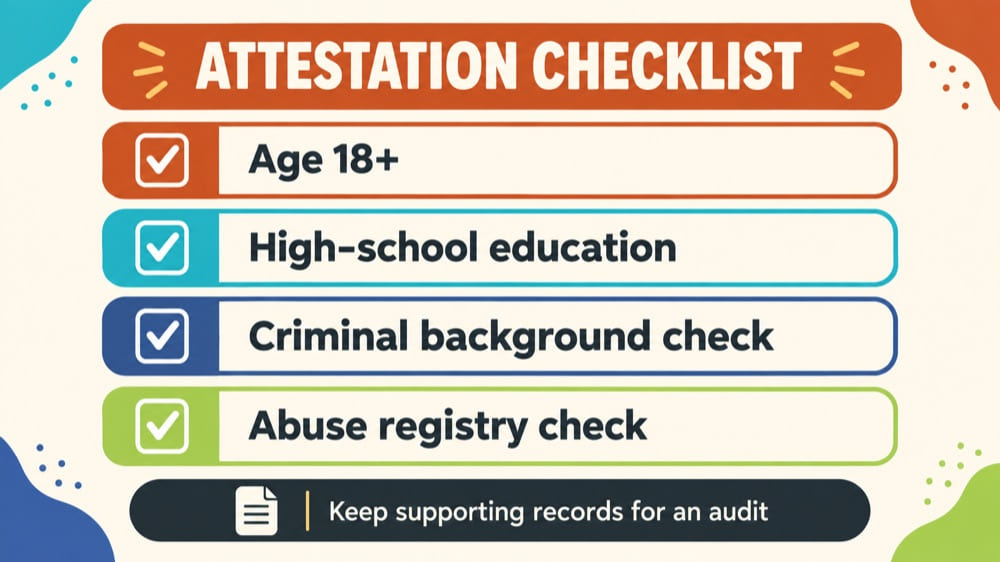
An Attesting Certificant confirms your age, high-school-level education, criminal background check, and abuse registry check. The form must be completed no more than 90 days before you pay for the RBT certification application, then uploaded with that application. The background and abuse-registry checks have their own timing requirement, generally no more than 180 days before paying for the application.
The person who attests may not be related to, subordinate to, or employed by the applicant. Before submitting, make sure the form, your other documents, and your BACB portal account use matching identifying information.
Check the current form and version first
Start with the current BACB RBT Handbook and the BACB RBT application resources. Requirements and form links can change, so a PDF saved from an older application cycle should not automatically be treated as the current form.
Before you fill anything out, verify:
- the form is the RBT Certification Application Attestation form, not a recertification competency packet;
- the form version is the one linked from the current BACB application instructions;
- the names and dates you will enter match the records you plan to upload; and
- the BACB portal still lists the same document and upload instructions.
Who completes and signs the attestation?
The applicant supplies the application information, but the attesting certificant confirms the eligibility facts described by BACB. The attesting person should be able to support the attestation if BACB requests documentation during an audit.
The attesting certificant may not be:
- related to the applicant;
- subordinate to the applicant; or
- employed by the applicant.
Do not choose a signer simply because they are available. Confirm that the relationship satisfies the current handbook and that the signer understands what they are confirming. If you are unsure about a relationship or a document, use BACB’s official contact process rather than guessing.
Do not confuse the 180-day and 90-day windows
The most common timing mistake is treating every date on the application as one deadline. There are two different checks:
| Item | What to check | Why it matters |
|---|---|---|
| Criminal background check and abuse registry check | Generally no more than 180 days before paying for the certification application | The checks support the eligibility information being attested |
| Attestation form | Completed no more than 90 days before paying for the certification application | The signed form itself has a separate application timing window |
Count the dates from the event BACB identifies in the current handbook—paying for the certification application—not from the date you first opened an account or started a training course. If a check is too old, ask the organization that performed it how to obtain a current result before you submit.
What to prepare before asking for a signature
Prepare a simple document checklist before the attesting certificant reviews the form:
- Your legal name as it appears in the BACB portal and on your government identification.
- Your date of birth or other information requested by the current form.
- The dates and results of the criminal background and abuse registry checks.
- Evidence of the required high-school-level education or equivalent, if requested in your application workflow.
- The form version and the date on which the attestation will be completed.
- A plan for keeping the signed form legible and available for upload.
Keep the checklist focused on the application. Do not email sensitive records to people who do not need them, and do not upload extra personal information just because a third-party checklist mentions it.
How the form fits into the application
After the applicable eligibility items are complete, log in to the BACB portal and start the RBT Certification Application in the Applications area. The current handbook instructs applicants to upload the attestation form along with the other required application documents. The system accepts PDF or JPEG documents, and unclear or unreadable files may not be accepted.
Use this order:
- Confirm that your BACB portal profile uses your current identifying information.
- Confirm the attestation and background-check dates are within the applicable windows.
- Review the signed form for missing fields, signatures, and unreadable text.
- Upload the form in the certification application with the other required documents.
- Check that the uploaded documents match the name in the portal.
- Save the submission confirmation and monitor the portal for email or Action Item feedback.
For the broader application sequence, see the existing RBT certification application guide. For the separate performance assessment, see the RBT initial competency assessment guide.
Common submission problems
- Using the wrong packet. The initial attestation form is not the initial competency assessment or recertification packet.
- Using one deadline for every document. Separate the 180-day check window from the 90-day attestation window.
- Choosing an ineligible signer. Review the relationship restrictions before asking for a signature.
- Uploading an unreadable scan. Open the final PDF or JPEG yourself before submitting.
- Name mismatch. Make sure the portal name and application documents match; use the official name-change process when they do not.
- Relying on an old form. Recheck the current BACB resource immediately before submission.
What if BACB sends an Action Item?
Read the determination email and the Action Items widget in your BACB portal. Follow the specific correction request, upload the requested material through the instructed path, and keep a copy of what you submitted. An Action Item is an instruction to correct or provide information; it is not a reason to invent a new document or assume that the application is permanently denied.
Do not promise yourself a fixed review time. BACB’s Application Processing Updates page is the current place to check processing information. If the official instructions conflict with an older blog post or a provider checklist, use the current BACB instructions and contact process.
Frequently asked questions
Is the RBT attestation form the same as the competency assessment?
No. The attestation confirms eligibility information. The Initial Competency Assessment measures performance of the required technician tasks and is a separate application document.
Can my employer sign the attestation?
Not automatically. The current handbook restricts who may serve as the attesting certificant, including a person employed by the applicant. Review the relationship before selecting a signer.
Does the 90-day rule apply to my background check?
Do not assume that. The handbook describes a separate timing requirement for background and abuse registry checks and a 90-day window for completing the attestation form. Verify the current rules before paying.
What file format should I upload?
The current handbook states that the application system accepts PDF or JPEG documents. The file must also be readable and match the name in your BACB portal account.
Does this article promise application approval?
No. It is an independent preparation guide. BACB reviews the application under its current requirements and provides any Action Items or determination through its official channels.
Official sources and review note
Reviewed on September 27, 2026 against the BACB RBT Handbook, updated 06/2026, and the BACB Application Processing Updates page. Recheck the form version, fees, portal language, and current processing information immediately before publication.
Make your application checklist easier to verify.
Use an application-readiness checklist to organize dates, documents, signer details, and portal checks before you submit.
Review the RBT application-readiness resources →
Ready to practice the RBT concepts you just reviewed?
Try an independent, original RBT practice resource with exam-style questions, scoring, and answer explanations.
References
- Behavior Analyst Certification Board. RBT Test Content Outline, 3rd edition.
- Behavior Analyst Certification Board. RBT Handbook.
- Behavior Analyst Certification Board. RBT Ethics Code.