
The RBT Portal Knowledge Base is the BACB’s navigation layer for common account, application, supervision, and portal questions. The fastest way to use it is to start with the official topic, search the exact task, check the article’s update context, and only then contact BACB if the instructions do not resolve the issue. This is especially important after the updated portal launched on June 29, 2026, because some older workflows have moved into the portal account.
Table of Contents
- What the RBT Portal Knowledge Base is for
- How to use the RBT Portal Knowledge Base: a five-step search workflow
- Where to look for common RBT questions
- How the 2026 portal transition changes the search
- When to stop searching and use Contact Us
- Common mistakes that slow down support
- Frequently asked questions
- Official sources and scope
BACB portal navigation and troubleshooting guide
RBT Portal Knowledge Base: Find Answers Faster
Search the right BACB topic, use current portal instructions, and know when an unresolved account issue belongs in Contact Us.
The RBT Portal Knowledge Base is the BACB’s navigation layer for common account, application, supervision, certification-information, and portal questions. The fastest way to use it is to start with the official topic, search the exact task, read the current article, and only then contact BACB if the instructions do not resolve the issue.
This matters because the updated BACB portal launched on June 29, 2026. Some older workflows moved into the portal account, including application materials, action items, certification information, and parts of RBT supervision management. An old screenshot or a coworker’s memory may describe the previous system. The live Knowledge Base and current portal instructions should control your next step.
What the RBT Portal Knowledge Base is for
BACB says the Portal Knowledge Base helps users find answers to common questions, access portal guidance, and stay informed about system updates. It is a self-service starting point, not a replacement for the user’s account, the RBT Handbook, a required application action item, or a formal BACB response.
Use it when your question sounds like a navigation or process question:
- Where do I find my certification information?
- How do I start or check an RBT Certification Application?
- What should I do with an application action item?
- How do I add, change, or view an RBT supervisor or Requirements Coordinator?
- What should I do if a portal page is missing information or shows an error?
- How do I reset a password or confirm the email associated with my account?
Start at the official BACB Portal Knowledge Base, not a search result that may point to an older article or an unofficial explanation. The home page exposes a search field and groups help under areas such as Account Information, Applications, and Managing Supervisees.
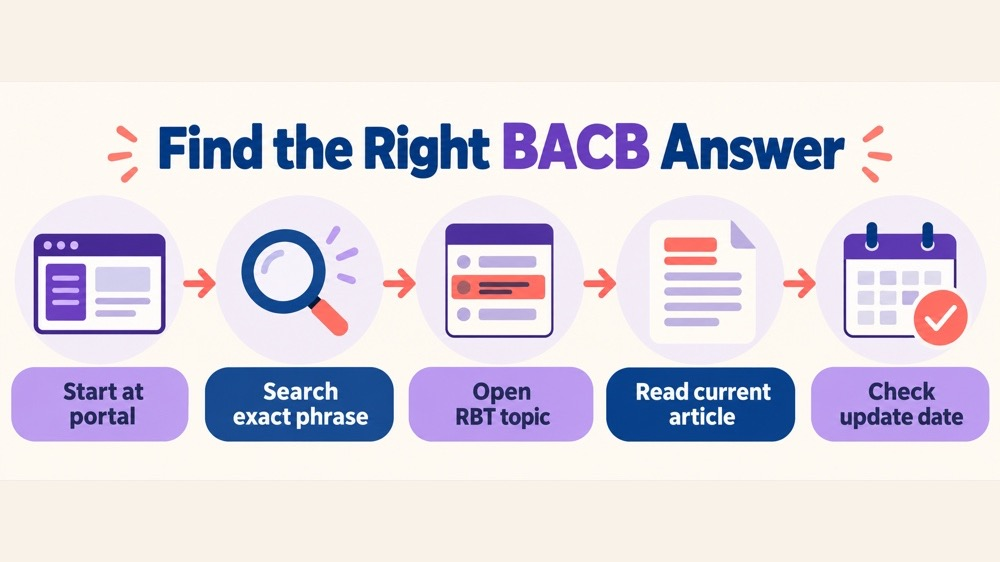
How to use the RBT Portal Knowledge Base: a five-step search workflow
- Start at the official portal help page. Confirm that the address is on bacb.com and that the page identifies itself as the BACB Portal Knowledge Base.
- Search the task, not the emotion. Use a phrase such as “RBT action item,” “find certification information,” “reset password,” or “add supervisee.” “My portal is broken” is less useful than the action that failed.
- Open the matching topic. Choose the article that matches your certification level and the exact task. A general account article may not answer an RBT supervision question.
- Read the whole procedure and its conditions. Note whether the step requires an active application, a particular portal tab, a specific email address, a document type, or an action item.
- Check the update context and record the next action. Follow the current article, then write down what you tried, what happened, and any message or status shown before you contact BACB.
Searching by task also reduces duplicate support requests. If an article tells you to complete an action item inside the application, sending the same document through a different form may create a second problem rather than solve the first one.
Where to look for common RBT questions
Account Information
The Account Information section is the natural starting point for sign-in, profile, certification information, invoices, email, name, address, and account-status questions. It also includes articles about the difference between a BACB ID number and a certification number, how to view a certificant’s status, and what the Print Verification Report function means.
For a first sign-in after the portal update, read BACB’s step-by-step access guide. Existing account holders must use the email already associated with the account and reset the password before signing in. New users create a new account. If the reset code does not arrive, the guide directs users to check spam, verify the email, and use Contact Us if the problem remains.
Applications
Choose Applications when the question concerns starting an application, viewing status, responding to an action item, adding an assessor or attesting certificant in an RBT Certification Application, requesting an examination accommodation, viewing submitted documents, or applying for a retake. The exact eligibility and document requirements still come from the relevant handbook and the live application—not from a generic blog summary.
Pay attention to status language. “Awaiting Applicant Action,” “Awaiting Documents,” and a request for additional information may require different actions. Read the article that matches the visible status and do not submit the same document repeatedly unless the current instructions tell you to do so.
Managing Supervisees
Supervision questions belong in the Managing Supervisees section when you need to view supervisees, add an RBT or BCaBA, locate supervisor information, or remove or change an RBT supervision relationship. The new portal transition guide says that when adding an RBT supervisee, a user searches for the RBT in the Supervision tab and then indicates whether they are the RBT Supervisor or Requirements Coordinator.
This section is distinct from an article about the rules of RBT supervision. The Knowledge Base explains where to complete a portal task; the current RBT Handbook and supervision resources explain the requirements and responsibilities. If the issue is whether a supervision arrangement meets a professional requirement, read the handbook and use the appropriate BACB support route rather than treating a navigation article as a compliance determination.
How the 2026 portal transition changes the search
BACB’s Portal Transition Guide compares old and new processes. For RBT readers, the important pattern is that more work is now visible inside the portal account:
- Certification and recertification applications are submitted through the portal account, with missing information flagged in the application.
- Application status, such as an outstanding document status, can be viewed in the portal.
- Examination accommodation documents for a certification or retake application are submitted within the application.
- RBT supervisors and Requirements Coordinators manage supervisees through the Supervision tab.
- Active RBTs can access and print a PDF Verification Report that reflects their certification information as shown on the Certificant Registry.
- Account holders can see more detailed certification information in the portal, including inactive-status reasons, recertification cycles, and status-change history.
These changes create a useful search rule: if the question involves your own application, documents, action items, or account history, look for a Knowledge Base article that points you back into the portal. If the question asks whether you personally meet a requirement, use the relevant handbook and formal review process. Navigation guidance is not an approval decision.
When to stop searching and use Contact Us
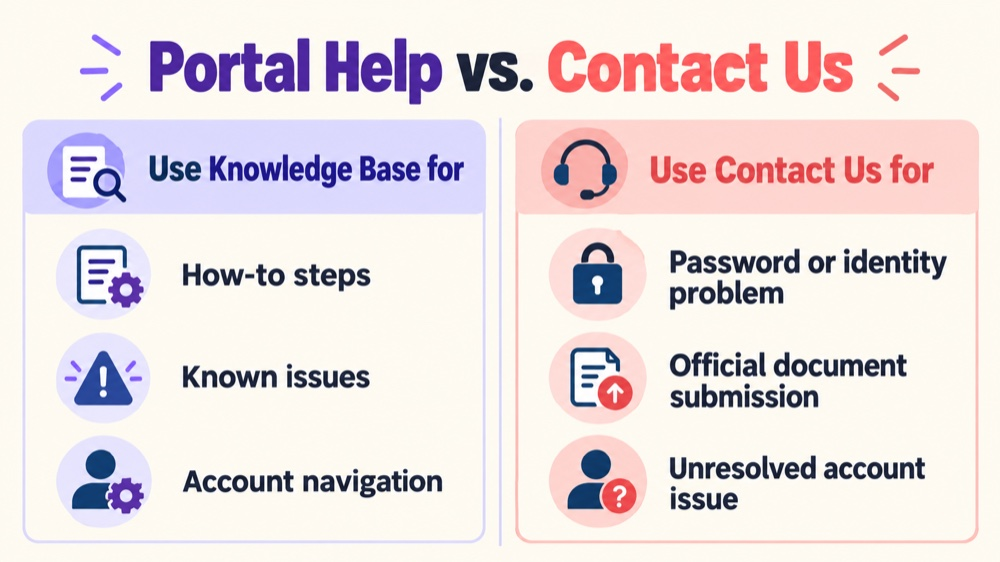
The Knowledge Base is most helpful when the answer is a repeatable procedure. Stop searching and use the official BACB Contact Us Form when the article does not resolve an account-specific problem, when BACB needs to verify your identity, or when the current instructions direct you to submit a request or document through that route.
Before sending the inquiry, prepare a concise record:
- the certification level or account role, such as RBT, Supervisor, or Requirements Coordinator;
- the official page or portal tab where the problem occurred;
- the exact step you followed and the date you tried it;
- the exact error or status message, without including unnecessary private client information;
- the Knowledge Base article or transition instruction you already reviewed; and
- the outcome you need, such as account access, identity verification, or clarification of the next required action.
For account access, BACB states that support may need to verify the identity of the account holder. Do not create a second account merely because you cannot sign in to the first one, and do not ask a supervisor or employer to control your personal account. Use the email associated with the BACB account and follow the reset or Contact Us instructions.
Common mistakes that slow down support
- Using a pre-transition screenshot: the page layout or process may belong to the old account system.
- Searching a broad phrase: “RBT portal” returns less useful results than the exact task or status message.
- Choosing the wrong role: an RBT, Supervisor, and Requirements Coordinator may see different actions and responsibilities.
- Ignoring status conditions: an action item, an application status, and an account-access problem do not have the same remedy.
- Submitting documents through the wrong route: if the application or portal tells you where to upload a document, follow that instruction.
- Creating duplicate accounts: use the existing email and password-reset process unless BACB directs otherwise.
- Sending sensitive information too early: include only what the official form requests and redact unrelated client or employment information.
Frequently asked questions
Is the RBT Portal Knowledge Base the same as the RBT Handbook?
No. The Knowledge Base is primarily for portal navigation, account questions, known issues, and task procedures. The RBT Handbook is the authority for certification requirements and maintenance rules. Use both when a portal action depends on an eligibility or compliance requirement.
Can I search the Knowledge Base without signing in?
The public Knowledge Base home page provides searchable guidance. Some actions and account information are available only after you sign in to the BACB portal. Do not share your password or verification code with another person.
What if the article says to use the portal but I cannot log in?
Use the official access guide: existing account holders reset the password with the email already on file, check spam or junk for the code, and use Contact Us if access remains unresolved. Do not create a duplicate account without BACB direction.
Can a supervisor submit or manage my RBT account for me?
Your personal account and login should remain under your control. A supervisor or Requirements Coordinator may have a separate authorized supervision role in the portal, but that does not make them the owner of your personal account.
Does finding a Knowledge Base article mean BACB has approved my action?
No. The article explains a process. BACB’s formal review, application status, action-item response, or account decision controls the outcome for your specific situation.
Official sources and scope
This guide was checked against the BACB Portal Knowledge Base, the new-account access guide, the Portal Transition Guide, the Contact Us Form, the BACB portal, and the RBT resource page. Portal articles, system status, forms, and requirements can change. Use the live BACB instructions for a real account or application issue.
Ready to practice the RBT concepts you just reviewed?
Try an independent, original RBT practice resource with exam-style questions, scoring, and answer explanations.
References
- Behavior Analyst Certification Board. RBT Test Content Outline, 3rd edition.
- Behavior Analyst Certification Board. RBT Handbook.
- Behavior Analyst Certification Board. RBT Ethics Code.