
If you are looking for RBT remove supervisee steps, the BACB process is short, but the supervision transition around it deserves care. The current official process is to log in to the BACB account, open the Supervisees tab, select Remove next to the supervisee’s name, and confirm with Ok. The update generates an email to the supervisor and supervisee, and BACB asks users to allow 24 hours for the registry to update. This guide explains the portal action, what to verify before and after it, and how to avoid leaving a gap in supervision.
Table of Contents
- What RBT remove supervisee means
- Before you remove an RBT from the BACB Portal
- The official RBT remove supervisee steps
- After RBT remove supervisee: what happens next
- How to prevent a supervision gap
- Common mistakes to avoid
- Frequently asked questions
- Official sources and scope
RBT supervision administration guide
RBT Remove Supervisee: BACB Portal Steps
RBT remove supervisee: follow the official portal action, communicate the change, and plan the next supervision record.
If you are searching for RBT remove supervisee steps, the BACB portal action is short, but the supervision transition around it deserves care. The current official process is to log in to the BACB account, open the Supervisees tab, select Remove next to the supervisee’s name, and confirm with Ok.
BACB says the certificant will no longer appear in the supervisor’s Supervisees tab, an email will be sent to both people, and users should allow 24 hours for the registry to update. This guide explains the portal action, what to verify before and after it, and how to avoid leaving a gap in supervision. Use the current BACB resources if your screen or situation differs.
What RBT remove supervisee means
Removing an RBT supervisee is an account-record action. It updates the relationship shown in the supervisor’s BACB account; it is not the same as deleting the RBT’s certification, erasing historical supervision, or automatically assigning another supervisor.
The action matters because BACB uses the portal record to show who is responsible for ongoing supervision. BACB explains that supervision only counts toward the applicable requirement when the RBT Supervisor or Requirements Coordinator has the RBT listed in the appropriate account record. If a supervisor is no longer providing oversight, leaving the old relationship in place can make the portal inaccurate.
At the same time, removal should be connected to a real transition. A supervisor should not use the button as a shortcut for resolving a disagreement, avoiding documentation, or shifting responsibility without communicating. Follow the organization’s transition procedure, protect client continuity, and keep the records that the current Handbook and applicable policies require.
Before you remove an RBT from the BACB Portal
Before opening the account, confirm the basic facts:
- You are the person on record who should make the update. The portal relationship and the organization’s supervision structure should match.
- The supervision change is real. Confirm the end of the supervision relationship, a change in role, a coordinator structure, or another documented reason.
- The RBT has been informed. The portal email is an account notification; it should not be the only communication about a sensitive transition.
- Client and service responsibilities are covered. Coordinate with the organization so services, safety communication, and case responsibilities are not left unclear.
- Records are organized. Preserve supervision notes, relevant communications, dates, and other documentation according to the current requirements and the organization’s retention rules.
- The next record owner is known. If the RBT will continue working, identify the eligible supervisor or Requirements Coordinator who will handle the next portal update.
These checks do not add extra portal clicks. They reduce the risk of treating an administrative update as if it were the entire supervision transition.
The official RBT remove supervisee steps
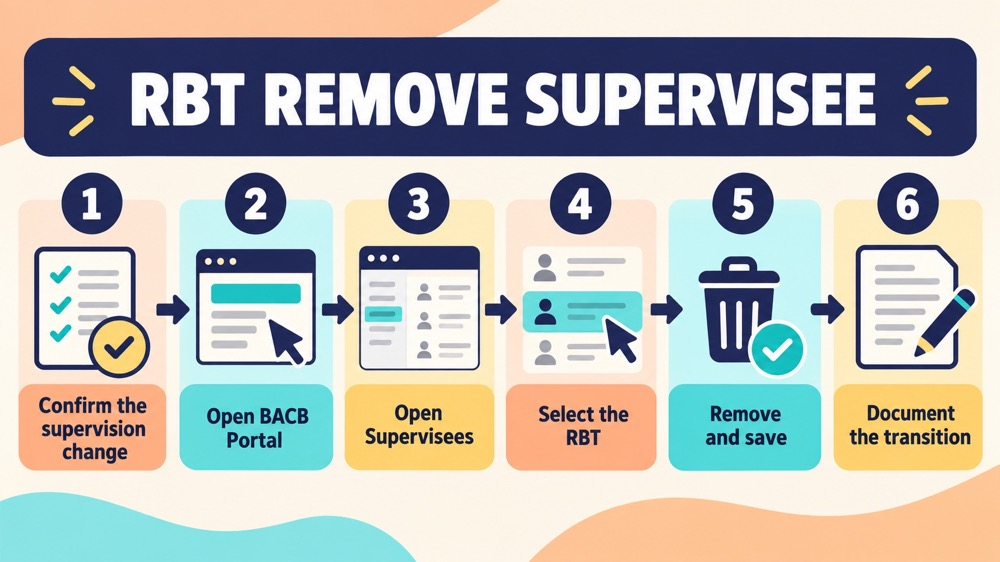
BACB’s Process for Adding or Removing Supervisees, version 09/2025, lists the removal sequence:
- Log in to your BACB account. Use the account that currently shows the supervision relationship.
- Open the “Supervisees” tab. BACB’s instructions place this tab on the far right of the account navigation.
- Find the RBT’s name. Review the record before selecting an action so you do not update the wrong certificant.
- Click “Remove” next to the supervisee’s name. This starts the removal action for that listed relationship.
- Click “Ok” to confirm. Read the confirmation prompt and confirm only when the intended relationship is selected.
- Review the Supervisees tab. BACB says the certificant will no longer appear in that tab after removal.
After RBT remove supervisee: what happens next
After the record is removed, BACB says an email will be sent to both the supervisor and the supervisee. BACB also asks users to allow 24 hours for the information to update in the Certificant Registry. The email and registry timing are useful verification points, but they are not a substitute for checking the account and communicating with the RBT.
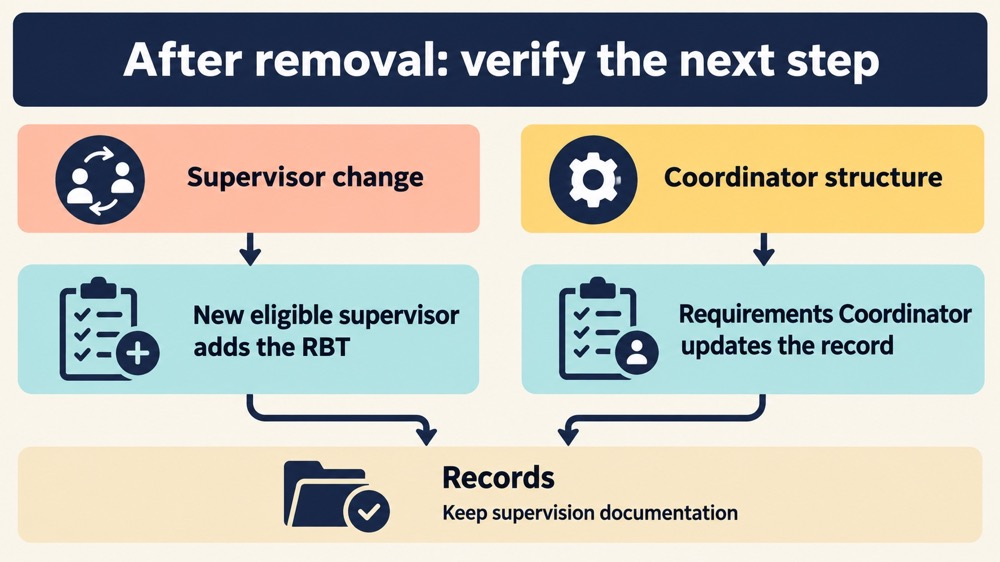
The removal does not create a new supervisor. If the RBT is continuing toward or maintaining certification, the next eligible supervisor or Requirements Coordinator must manage the replacement relationship through the current BACB process. The people involved should verify who is responsible, when the new supervision starts, and what documentation belongs to each period.
BACB’s guidance on situations where RBT certification does not go as planned explains that when an RBT has no supervisor on record, certification status can become inactive and the RBT cannot practice or bill for services. That is why the removal date and replacement plan should be treated as connected administrative events, not as unrelated clicks.
How to prevent a supervision gap
The right follow-up depends on the supervision structure:
- Supervisor change: the new eligible supervisor adds the RBT through the applicable portal process, then the people involved verify that the relationship appears correctly.
- Requirements Coordinator structure: if the organization is using a coordinator structure, the coordinator manages the appropriate record and supervision assignments instead of leaving multiple outdated supervisor entries.
- Employment or service transition: coordinate client and service responsibilities separately from the portal action. Removing a name does not transfer cases, records, or duties.
- Temporary uncertainty: pause and contact the organization or BACB through the appropriate channel if it is unclear who is eligible or responsible. Do not guess based only on a portal label.
Common mistakes to avoid
- Removing the wrong person: verify the name and relationship before confirming.
- Assuming removal transfers supervision: the official removal process removes the record; it does not add a replacement supervisor.
- Ignoring the date: write down the effective transition date and keep it consistent with supervision documentation.
- Relying only on the email: review the portal, communicate directly, and allow the stated registry-update window.
- Leaving an outdated supervisor listed: BACB’s supervision resources tell supervisors to remove RBT supervisees they are no longer supervising for an extended period.
- Deleting records: a portal relationship change does not mean historical supervision documentation should be discarded.
- Continuing service without a clear supervisor: resolve the supervision record before assuming the RBT can continue practicing or billing.
Frequently asked questions
Who can remove an RBT supervisee?
The BACB process is performed from the account that lists the supervisee. The person responsible for the record should follow the current Handbook, supervision structure, and organizational process to determine who should make the update.
What are the exact RBT remove supervisee clicks?
Log in to the BACB account, open the Supervisees tab, click Remove next to the supervisee’s name, and click Ok. Then review the tab and watch for the email notification.
Does removing a supervisee cancel the RBT certification?
Removal is a supervision-record action, not a cancellation button. However, if an RBT has no eligible supervisor or Requirements Coordinator on record, BACB explains that the certification status can be inactive and the RBT may not practice or bill for services.
How long does the update take?
BACB’s September 2025 process document says to allow 24 hours for the information to update in the registry. Treat that as the published waiting guidance, then verify the current account and registry information.
What if the Remove button is missing?
Do not create a duplicate account or guess at a workaround. Check the current Portal Knowledge Base and relevant BACB supervision resources, confirm that you are in the correct account, and contact BACB if the account-specific issue remains.
Official sources and scope
This guide was checked against BACB’s Process for Adding or Removing Supervisees, the Supervision, Assessment, Training, and Oversight resource page, BACB’s RBT supervision guidance, and the official articles about RBT certification not going as planned and supervising RBTs when things do not go as planned. Portal screens and requirements can change, so use the live BACB sources for current decisions.
Ready to practice the RBT concepts you just reviewed?
Try an independent, original RBT practice resource with exam-style questions, scoring, and answer explanations.
References
- Behavior Analyst Certification Board. RBT Test Content Outline, 3rd edition.
- Behavior Analyst Certification Board. RBT Handbook.
- Behavior Analyst Certification Board. RBT Ethics Code.